
Free invoicing in English for freelancers and small businesses in Germany: Invoice out.
Money in.
Write invoices and e-invoices. Saldiqo checks the mandatory details first. Then upload your bank statement: Saldiqo ticks off what has been paid, and you see who still owes you.
No credit card, no trial period. Take all your data with you, any time. What’s the catch?
147 invoice templatesE-invoices as XRechnung and ZUGFeRDInvoices in 7 languagesSet up for GermanyAustriaSwitzerlandUnited KingdomIrelandMaltaCyprus
How an invoice moves through Saldiqo
Quote
accepted
Line items from your products, and you see the PDF while you write.
Invoice
finalised
One click turns the quote into an invoice. Before finalising, Saldiqo checks the mandatory details under § 14 UStG.
E-invoice
created
XRechnung or ZUGFeRD are created from the same invoice.
Payment
matched
If invoice number and amount are on the bank statement, the invoice is paid.
VAT
Q4 2026 ready
Income, expenses and VAT are calculated, for ELSTER or your tax advisor.
What Saldiqo takes care of

Match payments
Upload your bank statement as CSV or CAMT. If a payment isn’t clear-cut, Saldiqo suggests matching invoices and you decide.
Reminders
Payment reminders and dunning levels with one click, with deadlines and fees.
Expenses and receipts
Photograph a receipt with your phone or upload it and record the expense.
Advance and partial invoices
Straight from the quote, no order needed in between. The final invoice deducts the advances automatically.
Several companies, one login
Switch between your companies and invite your team and tax advisor with their own permissions.
Your invoice, your letterhead
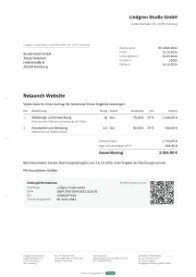
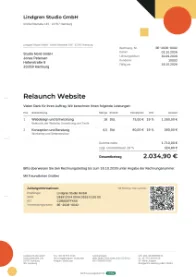
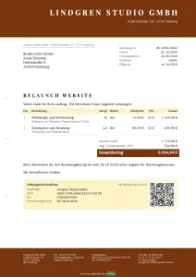
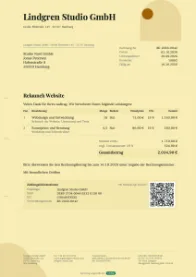
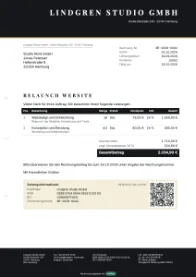
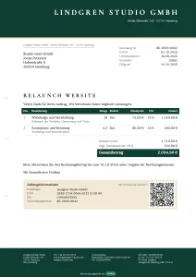
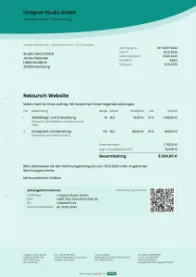
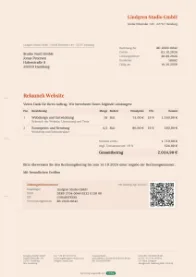
147 templates and 41 letterheads, all included. Your logo, your colours.
Free. Here’s how Saldiqo is funded.
€0per month, with every feature
How we make money
- Partners pay us for requests and sign-ups.
- In the savings check, Saldiqo shows you where you are probably paying too much. If you request an offer there yourself or sign up via a partner site labelled as an ad, the partner may pay us for it.
- No partner sees your invoices and bookings.
- Only your name, company name, contact details and topic are passed on, and only with your consent.
- You can switch the savings check off.
- For new accounts it is on for the company you create when you sign up, and it checks expenses and bank transactions once a week. Saldiqo stays fully usable without it.
- Unlimited invoices, quotes and reminders
- E-invoices and recurring invoices
- Several companies and a team with roles
- Saldiqo note on your invoices can be switched off
Saldiqo is currently free. If anything about the price changes, you’ll hear about it at least six weeks in advance.
Using sevDesk, Lexware or Papierkram? Bring your customers and products along as CSV
Made for Germany
The rules are built in, so you don’t have to look them up.
§ 19 UStG
Small businesses invoice without VAT, with the right note on the invoice. Saldiqo shows you how much headroom is left below the limit: €25,000 turnover in the previous year, €100,000 in the current year.
EN 16931
In Germany you have had to be able to receive e-invoices since 2025; sending them becomes mandatory from 2027 or 2028, depending on your previous-year turnover. Saldiqo writes XRechnung (UBL and CII) and ZUGFeRD and reads incoming e-invoices. As of October 2026.
DIN 5008
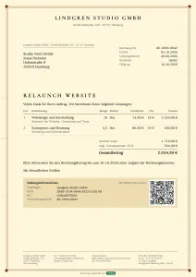
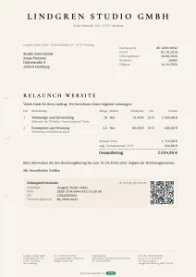
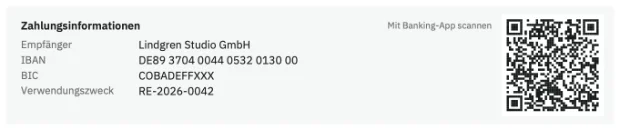
Invoices in German business-letter format, made for window envelopes, with a GiroCode so customers can pay with their banking app.
GoBD
Finalised invoices are locked against changes, corrections go through a correction invoice. A description of the software for your procedural documentation is included. Responsibility for the proper keeping of your books and for your company’s procedural documentation remains with you.
Security and your tax advisor
Your data
Separate encrypted database per company
Each company lives in its own database, encrypted with AES-256.
Sign-in with a second factor
With an authenticator app on your phone. End other sessions with one click.
Export everything, any time
Lists as CSV and a complete backup, no questions asked.
Your tax advisor is on board
Own access for the firm
You invite your tax advisor, they set their own password and see your figures without changing anything.
DATEV export
Export in DATEV format (EXTF, SKR 03) with one click. SKR 04 is not available yet.
Questions about the invoicing software
Is Saldiqo really free? How do you make money?
Yes, Saldiqo is currently free, with every feature and no trial period. We make money through partners in the savings check: it shows you where you are probably paying too much, and offers from partners can appear there, always labelled as ads. If you request one yourself and agree to sharing, the named partner receives your name, company name, contact details and topic. The partner may pay us for such requests and for sign-ups via a partner site. No partner sees your invoices and bookings. For new accounts the savings check is on, and you can switch it off at any time. If anything about the price changes, you’ll hear about it at least six weeks in advance.
Where is my data stored, is there a DPA?
Each company has its own encrypted database. The servers are run by Hostinger International Ltd., location: Frankfurt am Main, Germany. The data processing agreement (DPA) is part of the terms, and you’ll find it at the bottom of every page.
Can I send and receive e-invoices?
Yes. Saldiqo creates an XRechnung (UBL or CII) or a ZUGFeRD PDF from every invoice. You upload e-invoices you receive: Saldiqo displays them in readable form, keeps the original and turns the data into an expense.
Do I have to send e-invoices as a small business?
No, small businesses under § 19 UStG are exempt from sending them. In Germany, however, every business has had to be able to receive e-invoices since 2025, small businesses included. Saldiqo invoices without VAT and adds the right note to your invoices.
Is there a bank connection?
Not yet. You upload the bank statement as a CSV or CAMT file from your online banking. You don’t need your bank login for this.
How do I switch from sevDesk, Lexware or Papierkram?
Export customers and products from your current software as CSV and upload them to Saldiqo. You enter company details, logo and bank details once, and you set the format of your invoice numbers yourself. A starting value for the number sequence is not available yet. Keep your old invoices as PDFs.
Does Saldiqo meet the GoBD?
There is no official seal for the GoBD, and there is no audit report for Saldiqo. Saldiqo helps with what software can contribute: finalised invoices are locked against changes, invoice numbers are assigned sequentially, and document actions are logged. For your procedural documentation there is a description of the software. Responsibility for the proper keeping of your books and for your company’s procedural documentation remains with you.
Does Saldiqo replace my tax advisor?
No. Saldiqo prepares figures and receipts. Only your tax advisor may advise you.
Can my tax advisor work with me?
Yes. Invite your firm to the team in the settings. They get their own access with read rights for invoices, expenses and reports. The DATEV export is one click away.
Can I capture receipts with my phone?
Yes. Open Saldiqo in your phone’s browser and tap “Take photo of receipt” under Expenses. The photo is then attached to the expense.
What happens to my data if I stop or Saldiqo no longer exists?
You can export everything at any time: lists as CSV, bookings in DATEV format, invoices as PDF and XML, plus a complete backup. Other software can read these formats too. You delete your account yourself in the app, and then we delete your data.
Is Saldiqo available as an app?
Saldiqo runs in the browser and can be installed as an app on phone and computer, with its own icon and window. Programs for Mac and Windows and the App Store app are in the works.
Write your next invoice.
Free and without a trial period. No tax number yet? You can add it later.